
لا تقوم أجهزة TouchPoints™ بعلاج أو شفاء أي حالة طبية، لكنها تساعد في إدارة التوتر المصاحب للعديد من الحالات عند استخدامها جنبًا إلى جنب مع نمط حياة صحي.
FAQ
1. كيف تعمل أجهزة TouchPoints™
كيف تساعد أجهزة TouchPoints™ في تقليل التوتر؟
عندما تشعر بالتوتر، ينشط جزء “القتال أو الهروب” في الدماغ. تعمل أجهزة TouchPoints™ على نقلك إلى الجزء المنطقي والعقلاني من الدماغ، مما يتيح لك التفكير بوضوح والشعور بالهدوء خلال ثوانٍ قليلة.
القدرة على التفكير العقلاني دون الشعور بالتوتر الجسدي المصاحب تساعد الدماغ على تكوين مسارات عصبية جديدة إيجابية، مما يترك تأثيرًا دائمًا على الدماغ.
يمكنك مراجعة قسم كيف تعمل أجهزة TouchPoints™ لمزيد من المعلومات.
هل تعمل أجهزة TouchPoints™ على جميع الحالات المرتبطة بالتوتر والقلق؟
لماذا يجب ارتداء جهازين من TouchPoints™؟
2. معلومات عن المنتج
كيف تختلف مجموعات TouchPoints™
نظرة عامة
تستخدم جميع الخيارات الثلاثة — TouchPoint Essentials، TouchPoints مع أساور المعصم، وTouchPoints للنوم — نفس تقنية BLAST® المبتكرة لتعديل استجابة الجسم للتوتر.
تم تصميم كل مجموعة لتوفير تجربة تهدئة، تعزيز التركيز، تحسين الأداء، دعم النوم، تقليل الغضب والرغبات الشديدة.
جميعها تحتوي على ثلاثة أوضاع متشابهة:
الأزرق/البطيء: للنوم أو التأمل
الأصفر/المتوسط: للهدوء والتركيز
البنفسجي/السريع: للغضب أو الانزعاج
تأتي جميع المجموعات مع بطاريات قابلة لإعادة الشحن تعمل 3-4 ساعات ومقاومة للرذاذ.
الفرق الرئيسي يكون في الإكسسوارات المرفقة، طريقة الإيقاف، وأهلية استخدام FSA/HSA.
طريقة الإيقاف
الإيقاف اليدوي:
مرفق مع: TouchPoint Essentials وTouchPoints مع أساور المعصم
تعمل هذه الأجهزة حتى إيقافها يدويًا أو نفاد البطارية.
يوصى بها لمن يفضلون التحكم الكامل بالوقت أو يحتاجون لاستخدام طويل حسب الحاجة.
يمكن استخدامها لمساعدة النوم باستخدام وضع النوم، وإذا غفوت أثناء استخدامها فلا مشكلة — ستحتاج فقط لإعادة شحنها صباحًا.
الإيقاف التلقائي:
مرفق مع: TouchPoints للنوم
تتوقف تلقائيًا بعد 30 دقيقة أو عند الضغط على زر الإيقاف أو انخفاض البطارية.
مناسب لمن يفضل النوم مع تشغيل TouchPoints حيث يحافظ الإيقاف التلقائي على البطارية ويضمن توفر الجهاز عند الحاجة خلال اليوم.
الإكسسوارات المرفقة
مشابك الملابس: مرفقة مع TouchPoint Essentials
أساور سيليكون: مرفقة مع TouchPoints مع أساور المعصم
قابلة للتعديل، مريحة، تحافظ على TouchPoints قريبًا طوال اليوم
أساور قابلة للسحب بسحاب (للأطفال): مرفقة مع TouchPoints للنوم
يمكن ارتداؤها على المعصمين أو الكاحلين، تقلل من ضوضاء الاهتزاز وتوفر راحة للأطفال الذين لا يتحملون الأساور التقليدية
أهلية FSA/HSA
TouchPoints للنوم: يمكن شراؤها باستخدام FSA/HSA، قد تتطلب رسالة طبية من مقدم الخدمة.
TouchPoint Essentials وTouchPoints مع أساور المعصم: لا يغطيها FSA/HSA، لكنها يمكن استخدامها للنوم أو التركيز.
الإعدادات والاستخدام
الأزرق/البطيء: للنوم أو التأمل
الأصفر/المتوسط: للهدوء والتركيز
البنفسجي/السريع: للغضب أو الانزعاج
ملاحظة: جميع المجموعات متعددة الاستخدام، فمثلاً يمكن استخدام TouchPoints Essentials وTouchPoints مع أساور المعصم للنوم، وTouchPoints للنوم للتركيز.
تحديد حجم الأساور
صغير: 5.5″-6.7″ (140mm-170mm)
كبير: 6.7″-8.1″ (170mm-206mm)
عرض الشريط: 0.87” / 22mm
هل TouchPoints مقاومة للماء؟
ليست مقاومة للماء بالكامل لكنها مقاومة للعرق.
هل تصدر TouchPoints إشعاعات كهرومغناطيسية (EMFs)؟
نعم، تصدر إشعاعات تحت الحمراء لتشغيل الجهاز والمزامنة ولمدة 30 ثانية عند تغيير الإعدادات.
3. كيفية استخدام TouchPoints™
كيفية استخدام أجهزة TouchPoints™ ؟
Click to download How To Use Your TouchPoints.

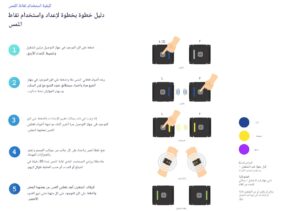
كيفية ارتداء TouchPoints™?
أجهزة TouchPoints™ لا تعالج أو تشفي أي حالة طبية، لكنها تساعد في إدارة التوتر المصاحب للعديد من الحالات عند استخدامها مع نمط حياة صحي.
يمكن ارتداؤها على جانبي الجسم باستخدام مشابك الملابس، الأساور القابلة للتعديل أو الأساور القابلة للسحب، أو ببساطة في راحة اليدين.
مدة استخدام TouchPoints™?
يُنصح باستخدام TouchPoints™ حسب الحاجة خلال اليوم، عادةً لفترات 5-30 دقيقة.
استخدام TouchPoints™ لمدة 15-30 دقيقة يمكن أن يترك تأثيرًا طويل الأمد يساعدك على البقاء هادئًا طوال اليوم حتى عند إيقافها.
تعمل تقنية BLAST™ على تكوين مسارات عصبية جديدة تساعد على تعديل الذكريات التي تثير استجابة التوتر، مما يقلل تدريجيًا من إفراز هرمونات التوتر مثل الأدرينالين والكورتيزول.
استخدام فترات قصيرة متعددة خلال اليوم يزيد من فعالية الأجهزة، ويطيل عمرها، ويساعدك على فهم وإدارة التوتر بشكل أفضل.
مدة الشحن وعمر البطارية?
تستغرق أجهزة TouchPoints™ 2-3 ساعات للشحن الكامل.
عمر البطارية يتراوح بين 3-4 ساعات حسب الإعداد المستخدم.
استخدام TouchPoints™ مع مرض باركنسون?
بعض مستخدمي TouchPoints™ مع مرض باركنسون الذين يستخدمون الأجهزة لتقليل نشاط الارتعاش أبلغوا عن استخدام الأجهزة لفترات أطول تصل إلى 4 ساعات.
قد يتطلب ذلك شراء أكثر من زوج من الأجهزة لتلبية الحاجة المستمرة.
TouchPoints™ تساعد على تقليل ارتعاش الحركة (Action Tremors)، وتحسن التحكم في العضلات، وتخفف من الغضب والقلق المرتبط بالمرض أو تأثيرات الأدوية المرتدة.
ماذا لو لم تعمل الأجهزة معي؟
لا توجد حالات معروفة تجعل الأجهزة غير فعالة. TouchPoints™ يعمل على جميع الأشخاص نظرًا لكيفية تكامل الدماغ للمعلومات الحسية.
إذا شعرت أن الأجهزة لا توفر الهدوء، جرّب تغيير الإعدادات لاكتشاف الأنسب لك.
إذا كنت تعاني من توتر شديد أو تفكير في حدث مرهق للغاية، قد يستغرق الشعور بالفرق أكثر من 30 ثانية. استمر في استخدام الجهاز وأعد التقييم كل دقيقة.
بعض الحالات الصحية الشديدة أو تأثير المخدرات/الكحول قد تؤثر على النتائج.
الأشخاص الذين لديهم اضطرابات انفصالية، التوحد، أو غياب الجسم الثفني قد لا يلاحظون التغيرات الإيجابية مباشرة رغم حدوثها.
4. الشحن
Where can you ship to?
You can order to the US and Canada directly from our website.
For Malaysia, please visit facebook.com/malaysiatouchpoint or contact touchpointmalaysia@gmail.com.
For Europe, please visit mindtecstore.com/ or contact
Country not listed? Please reach out to hello@thetouchpointsolution.com to learn of localized support in your area.
How long does shipping take?
Our team will process your order for shipping within 1 business day.
United States:
USPS Ground Advantage: 2 – 5 business days
UPS Ground: 1-5 business days
Carrier determined by order weight and size. Priority shipping is not available for US domestic orders due to carrier restrictions.
Canada:
UPS Worldwide Express: 1-5 business days
Customer is responsible for any customs and duties fees to Canada.
Where do you ship from?
We ship directly from Phoenix, Arizona.
For Malaysia, please visit facebook.com/malaysiatouchpoint or contact touchpointmalaysia@gmail.com.
For Europe, please visit mindtecstore.com/ or contact
info@mindtecstore.com.
5. الدفع والاسترجاع
Are TouchPoints covered by medical insurance?
TouchPoints are not covered by medical insurance however HSA/FSA cards can be used at checkout to purchase the TouchPoints for Sleep kit*.
*FSA/HSA provider may require a letter of medical necessity to purchase TouchPoints for Sleep as an OTC sleep aid.
Can I use my FSA/HSA funds for TouchPoints?
TouchPoints for Sleep can be purchased with your FSA/HSA funds.
Please note, FSA/HSA provider may require a letter of medical necessity to purchase TouchPoints for Sleep as an OTC sleep aid.
TouchPoint Essentials and TouchPoints with Wristbands can be used for sleep, however they are not covered by FSA/HSA funds. Click here to learn more about the difference between TouchPoints.
TouchPoint Essentials and TouchPoints with Wristbands can be used for sleep, however they are not covered by FSA/HSA funds. Click here to learn more about the difference between TouchPoints.
Can I demo TouchPoints first?
As a consumer, you have 30 days to decide if TouchPoints are the right fit for you. If not, you can return TouchPoints with our money back guarantee.
For organizations, we offer the following demo programs:
Therapists: Click to learn
EMDR Therapists: Click to learn
First Responders: Click to learn
Dentists: Click to learn
What is your return policy (money-back guarantee)?
- We offer a 30-day money back guarantee provided all TouchPoints components (TouchPoint devices, couplers, and charging cable) are returned undamaged and in working factory condition. The 30-day countdown is upon receipt of the package. If 30 days have gone by since you received your package, unfortunately we will not be able to refund or exchange.
- All sales are final after 30 days. Clearance items are non-refundable.
- Shipping charges are non-refundable.
- Request return merchandise authorization (RMA) by filling out this form. Once we receive your request for refund, our Customer Service team will issue an RMA number and provide a pre-paid return shipping label. This two-step return process will ensure you are using your TouchPoints correctly so you can experience the stress reduction that thousands of customers have experienced.
- Refunds are credited back to the original method of payment.
How do I return for refund?
- Request return merchandise authorization (RMA) by filling out this form. Once we receive your request for refund, our Customer Service team will issue an RMA number and provide return instructions. This two-step return process will ensure you are using your TouchPoints correctly so you can experience the stress reduction that thousands of customers have experienced.
What if I can't afford TouchPoints?
It’s our purpose to make our technology as accessible as possible and available to people of all ages and walks of life. Our Touch of Hope scholarship program is for individuals and families with financial need who seek to improve their lives through applied neuroscience.
We award sets every month. Click here to apply.
6. ضمان المنتج والتغطية
What type of coverage is included with my purchase?
How do I register my TouchPoints for the manufacturer's warranty and TouchPoint Care?
To register your TouchPoints, please go to TouchPoints Registration page.
How do I reset my TouchPoints?
Some of the most common issues can be fixed with a simple reset! It’s a useful step if your TouchPoints seem to be stuck, have trouble vibrating, or are not working normally.
How to reset your TouchPoints
1. Plug your devices into a laptop or desktop computer using the included micro-USB cable. Laptop/Desktop must be powered on and logged in.
2. Plug your TouchPoints in and out of the dual-pronged charging cable 3-4 times.
3. While plugged in, hold the TouchPoint buttons down for a solid 5 seconds. Count 1 Mississippi 2 Mississippi 3 Mississippi…
4. Unplug the TouchPoints and leave off the charging cable for at least 15 minutes and then plug the devices back up for an overnight charge.
If you’re still having issues or have questions about troubleshooting, please contact Customer Support.
📝 Contact Us
📧 info@touchpointgcc.com